
Me again.
I have selected to use PayPal Express / PayPal Direct Payments method as the two PayPal modules. I have obtained both my live and sandbox API credentials and have entered them. I know they work as when I click "Balance" PayPal returns both Sandbox and Live balances to my screen.
When I install the direct Payments module, all credit card boxes are ticked. If I edit that module to change credit cards accepted or change from Live to Sandbox, as soon as I hit Save, it disables all Credit Cards - unticking all of them. If I then tick all cards, or some of them, and save, it does not save that change, leaving all cards unselected. Setting back to Live does not allow me to re-enable cards.
The only way cards can be re-enabled is by removing module and re-installing.
PayPal Direct Payments Module - payment method unticked

-
burt

- Core Team
- Posts: 4745
- Joined: Tue Oct 29, 2019 9:37 am
- Phoenix Version: v1.1.0.8
- : Buy Me A Beverage
- Has thanked: 280 times
- Been thanked: 469 times
Re: PayPal Direct Payments Module - payment method unticked
Could you change this line:
https://github.com/gburton/CE-Phoenix/b ... ds.php#L34
To this:
Save. Upload. Try again.
Report back.
https://github.com/gburton/CE-Phoenix/b ... ds.php#L34
To this:
Code: Select all
$input .= '<input type="checkbox" class="custom-control-input" id="cardsSelection' . ucfirst($key) . '" name="card_types[]" value="' . $key . '"' . (in_array($key, $active) ? ' checked="checked"' : '') . '>';
Report back.
I am not here to build for you.
I am here to build with you. Let's help each other.
I am here to build with you. Let's help each other.
-
DarioMartin
Re: PayPal Direct Payments Module - payment method unticked
YES!! That fixed it. Thank you again Burt. Can confirm I can now change / edit attributes in Admin without losing card typesburt wrote: ↑Thu Dec 10, 2020 6:20 pm Could you change this line:
https://github.com/gburton/CE-Phoenix/b ... ds.php#L34
To this:
Save. Upload. Try again.Code: Select all
$input .= '<input type="checkbox" class="custom-control-input" id="cardsSelection' . ucfirst($key) . '" name="card_types[]" value="' . $key . '"' . (in_array($key, $active) ? ' checked="checked"' : '') . '>';
Report back.
-
burt
- Core Team
- Posts: 4745
- Joined: Tue Oct 29, 2019 9:37 am
- Phoenix Version: v1.1.0.8
- : Buy Me A Beverage
- Has thanked: 280 times
- Been thanked: 469 times
Re: PayPal Direct Payments Module - payment method unticked
> YES!! That fixed it. Thank you again Burt. Can confirm I can now change / edit attributes in Admin without losing card types
TY. This will be fixed in the next version.
https://github.com/gburton/CE-Phoenix/c ... e1e19b8580
TY. This will be fixed in the next version.
https://github.com/gburton/CE-Phoenix/c ... e1e19b8580
I am not here to build for you.
I am here to build with you. Let's help each other.
I am here to build with you. Let's help each other.
-
DarioMartin
Re: PayPal Direct Payments Module - payment method unticked
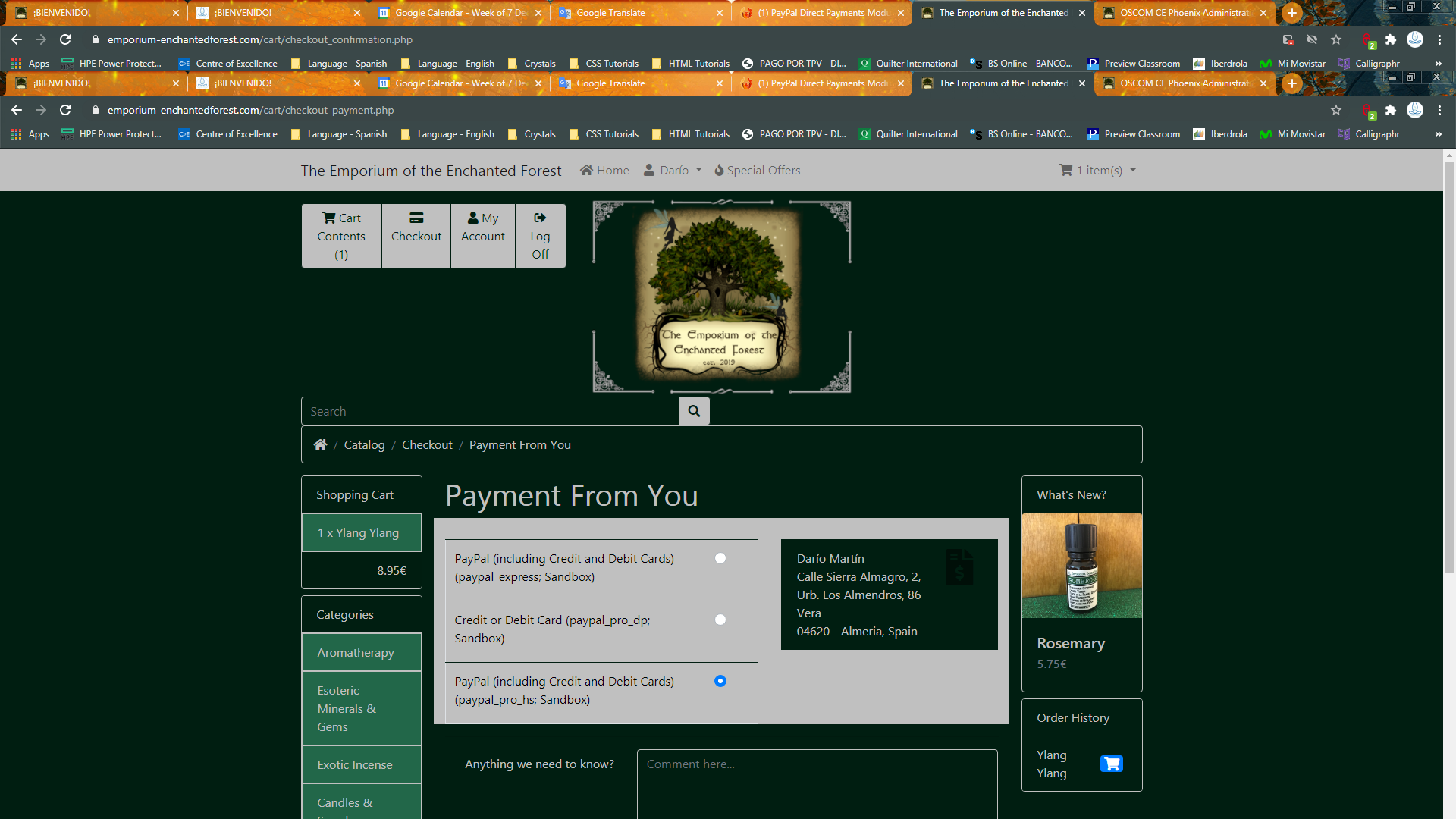
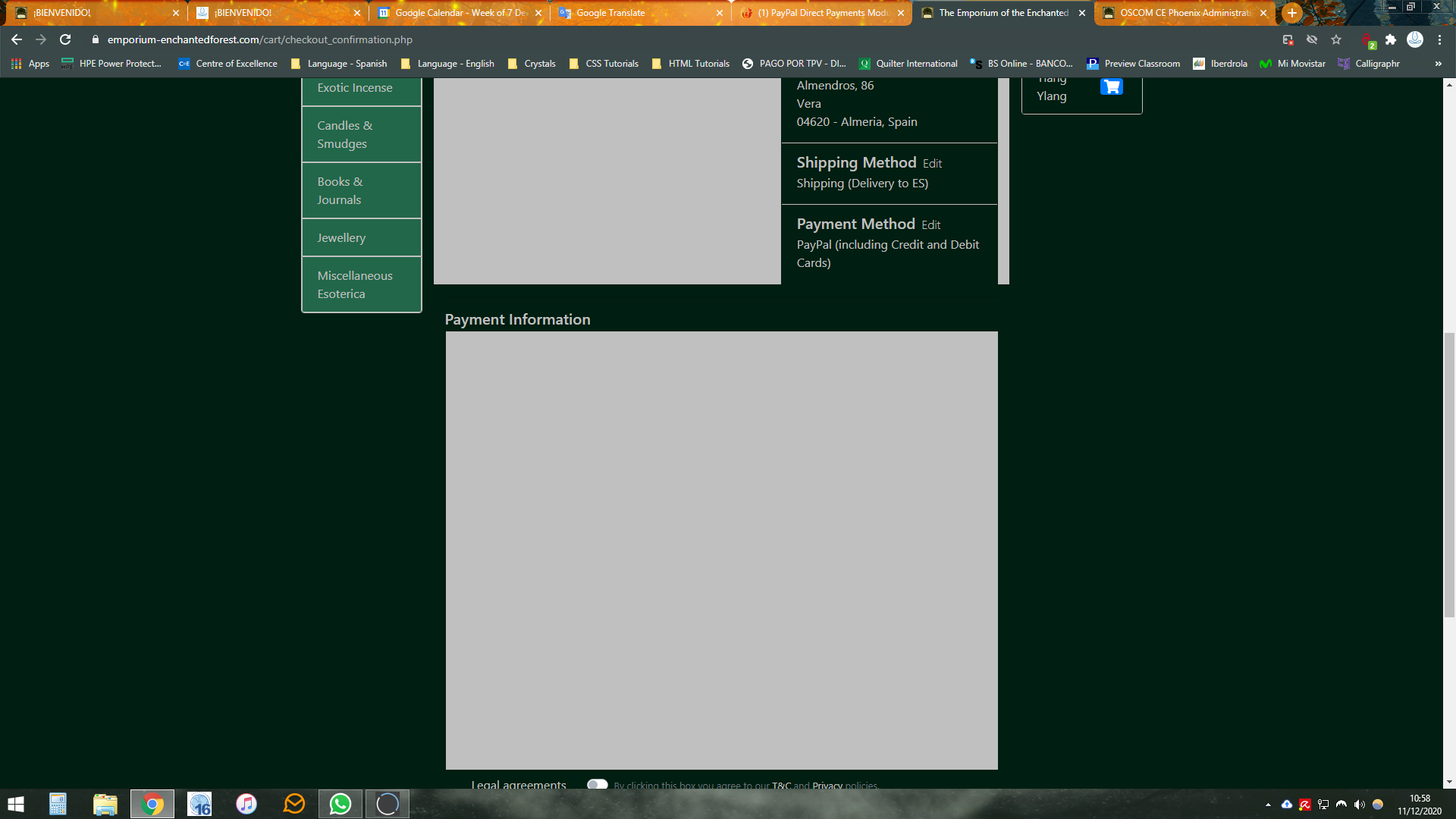
Do you want to have a look at hosted version as well? I tried using that as well, but on payment screen, I got a blank screen that had the "waiting" spinning wheel, but then went to a PayPal screen that said "This card is not available, please try a different card" - and I hadn't even got to putting card details in. I'll reinstall Hosted Solution now and run a transaction, then do screenshots to show what I mean
-
DarioMartin
Re: PayPal Direct Payments Module - payment method unticked
Well it's not crashing on PayPal screen with this browser now, but still not displaying Hosted Solution frame / boxDarioMartin wrote: ↑Fri Dec 11, 2020 9:55 am Do you want to have a look at hosted version as well? I tried using that as well, but on payment screen, I got a blank screen that had the "waiting" spinning wheel, but then went to a PayPal screen that said "This card is not available, please try a different card" - and I hadn't even got to putting card details in. I'll reinstall Hosted Solution now and run a transaction, then do screenshots to show what I mean
-
burt
- Core Team
- Posts: 4745
- Joined: Tue Oct 29, 2019 9:37 am
- Phoenix Version: v1.1.0.8
- : Buy Me A Beverage
- Has thanked: 280 times
- Been thanked: 469 times
Re: PayPal Direct Payments Module - payment method unticked
Iframe. Don't use Hosted Solution as many browsers wont show iframes.
I am not here to build for you.
I am here to build with you. Let's help each other.
I am here to build with you. Let's help each other.
-
DarioMartin
Re: PayPal Direct Payments Module - payment method unticked
Quick fix there Burt thanks; Direct Payments it is
-
Thinlizzy80
Re: PayPal Direct Payments Module - payment method unticked
I am sorry I was reading this posts and making many tests. I use CE Phoenix 1.0.7.5 under php 7.3
I've installed these 3 modules: PayPal Express Checkout,PayPal Payments Pro (Direct Payment) and PayPal Payments Pro (Hosted Solution)
when I insert that line on my card.php
$input .= '<input type="checkbox" id="cardsSelection' . ucfirst($key) . '" name="card_types[]" value="' . $key . '"' . (in_array($key, $active) ? ' checked="checked"' : '') . '><label for="cardsSelection' . ucfirst($key) . '">' . $value . '</label>';
I got a new pop window automatically:
errors: Error Processing Payment
ErrorMessage
This transaction can't be processed. Please pay with another card.
Question2) I nave installed the fixer module for currencies I got this
The exchange rate for EUR was updated successfully via Fixer.
The exchange rate for USD was updated successfully via Fixer.
The exchange rate for PEN was updated successfully via Fixer.
but when I simulate the payment under PEN currency under paypal I got this: Receiving country does not support the transaction currency.
question 3) When I use the option card under Credit or Debit Card I got this afer enter the details of a card:
The merchant country is not supported.
can you give me an Idea thanks for your support.
I've installed these 3 modules: PayPal Express Checkout,PayPal Payments Pro (Direct Payment) and PayPal Payments Pro (Hosted Solution)
when I insert that line on my card.php
$input .= '<input type="checkbox" id="cardsSelection' . ucfirst($key) . '" name="card_types[]" value="' . $key . '"' . (in_array($key, $active) ? ' checked="checked"' : '') . '><label for="cardsSelection' . ucfirst($key) . '">' . $value . '</label>';
I got a new pop window automatically:
errors: Error Processing Payment
ErrorMessage
This transaction can't be processed. Please pay with another card.
Question2) I nave installed the fixer module for currencies I got this
The exchange rate for EUR was updated successfully via Fixer.
The exchange rate for USD was updated successfully via Fixer.
The exchange rate for PEN was updated successfully via Fixer.
but when I simulate the payment under PEN currency under paypal I got this: Receiving country does not support the transaction currency.
question 3) When I use the option card under Credit or Debit Card I got this afer enter the details of a card:
The merchant country is not supported.
can you give me an Idea thanks for your support.
-
ecartz
- Core Team
- Posts: 3087
- Joined: Tue Nov 05, 2019 6:02 pm
- Phoenix Version:
- Has thanked: 4 times
- Been thanked: 208 times
Re: PayPal Direct Payments Module - payment method unticked
List of currencies supported by PayPal: https://developer.paypal.com/docs/repor ... urrencies/
No PEN on that list.
No PEN on that list.