Difference between revisions of "How to Use a Template"
PeterRobert (talk | contribs) |
PeterRobert (talk | contribs) |
||
| Line 36: | Line 36: | ||
On Line 99, change <pre>"card h-100 is-product"</pre> to <pre>"card h-100 is-product text-center"</pre> | On Line 99, change <pre>"card h-100 is-product"</pre> to <pre>"card h-100 is-product text-center"</pre> | ||
| + | |||
| + | This will centre the contents. | ||
Delete lines 122-126 | Delete lines 122-126 | ||
| Line 44: | Line 46: | ||
$prod_list_contents .= '</div>' . PHP_EOL; | $prod_list_contents .= '</div>' . PHP_EOL; | ||
}</pre> | }</pre> | ||
| + | |||
| + | This will delete the meta description. | ||
Delete lines 125-131 | Delete lines 125-131 | ||
| − | + | <pre> $prod_list_contents .= '<div class="card-footer bg-white pt-0 border-0">' . PHP_EOL; | |
$prod_list_contents .= '<div class="btn-group" role="group">'; | $prod_list_contents .= '<div class="btn-group" role="group">'; | ||
$prod_list_contents .= tep_draw_button(IS_PRODUCT_BUTTON_VIEW, '', tep_href_link('product_info.php', tep_get_all_get_params(array('action')) . 'products_id=' . (int)$listing['products_id']), NULL, NULL, 'btn-info btn-product-listing btn-view') . PHP_EOL; | $prod_list_contents .= tep_draw_button(IS_PRODUCT_BUTTON_VIEW, '', tep_href_link('product_info.php', tep_get_all_get_params(array('action')) . 'products_id=' . (int)$listing['products_id']), NULL, NULL, 'btn-info btn-product-listing btn-view') . PHP_EOL; | ||
| Line 53: | Line 57: | ||
if ($has_attributes == 0) $prod_list_contents .= tep_draw_button(IS_PRODUCT_BUTTON_BUY, '', tep_href_link(basename($PHP_SELF), tep_get_all_get_params(array('action')) . 'action=buy_now&products_id=' . (int)$listing['products_id']), NULL, array('params' => 'data-has-attributes="' . $has_attributes . '" data-in-stock="' . (int)$listing['in_stock'] . '" data-product-id="' . (int)$listing['products_id'] . '"'), 'btn-light btn-product-listing btn-buy') . PHP_EOL; | if ($has_attributes == 0) $prod_list_contents .= tep_draw_button(IS_PRODUCT_BUTTON_BUY, '', tep_href_link(basename($PHP_SELF), tep_get_all_get_params(array('action')) . 'action=buy_now&products_id=' . (int)$listing['products_id']), NULL, array('params' => 'data-has-attributes="' . $has_attributes . '" data-in-stock="' . (int)$listing['in_stock'] . '" data-product-id="' . (int)$listing['products_id'] . '"'), 'btn-light btn-product-listing btn-buy') . PHP_EOL; | ||
$prod_list_contents .= '</div>' . PHP_EOL; | $prod_list_contents .= '</div>' . PHP_EOL; | ||
| − | $prod_list_contents .= '</div>' . PHP_EOL; | + | $prod_list_contents .= '</div>' . PHP_EOL;</pre> |
| + | |||
| + | This will delete the card footer and the '''View''' and cart button. | ||
| + | |||
Upload the new '''/templates/override/includes/components/''' to your server. | Upload the new '''/templates/override/includes/components/''' to your server. | ||
| + | Reload the shop page to see the change: | ||
| + | <div class="mainpage_box"> | ||
| + | [[File:templateproductlistingnew.png|link=]] | ||
| + | </div> | ||
<hr> | <hr> | ||
{{Page_In_Progress}} | {{Page_In_Progress}} | ||
{{Contribute}} | {{Contribute}} | ||
Revision as of 06:12, 5 February 2021
<historylink type="back">🠈 Back</historylink> 🠉 FAQS TIPS & TRICKS
In a new installation the override template is selected.
The override template is stored in the templates folder/directory of your shop in the override folder/directory.
Additional templates can be installed or created in the templates folder/directory.
These can then be selected in Configuration → My Store → Template Selection
The files in the override template (or other template installed or created and then selected) will override the files in the shop and files in the default template.
Files in the override template will never be overwritten by updates so any changes will persist.
Example
Make some changes to product_listing.php which displays products in the shop.
This file is located in the default template in /templates/default/includes/components/
The changed file needs to be saved using the same folder structure in the override template so will be saved in /templates/override/includes/components/
So, create the folder components in /templates/override/includes/ - this can be done in your website backup folder on your local computer.
Now, open /templates/default/includes/components/product_listing.php and save a copy in the new /templates/override/includes/components/
On a clean 1.0.7.14 install, on the shop side, go to Categories → Fruit → Apples & Pears to see this:

Now, edit the new /templates/override/includes/components/product_listing.php
On Line 99, change
"card h-100 is-product"
to
"card h-100 is-product text-center"
This will centre the contents.
Delete lines 122-126
if (tep_not_null($listing['products_seo_description'])) {
            $prod_list_contents .= '<div class="pt-2 font-weight-lighter">';
              $prod_list_contents .= $listing['products_seo_description'];
            $prod_list_contents .= '</div>' . PHP_EOL;
          }
This will delete the meta description.
Delete lines 125-131
  $prod_list_contents .= '<div class="card-footer bg-white pt-0 border-0">' . PHP_EOL;
          $prod_list_contents .= '<div class="btn-group" role="group">';
            $prod_list_contents .= tep_draw_button(IS_PRODUCT_BUTTON_VIEW, '', tep_href_link('product_info.php', tep_get_all_get_params(array('action')) . 'products_id=' . (int)$listing['products_id']), NULL, NULL, 'btn-info btn-product-listing btn-view') . PHP_EOL;
            $has_attributes = (tep_has_product_attributes((int)$listing['products_id']) === true) ? '1' : '0';
            if ($has_attributes == 0) $prod_list_contents .= tep_draw_button(IS_PRODUCT_BUTTON_BUY, '', tep_href_link(basename($PHP_SELF), tep_get_all_get_params(array('action')) . 'action=buy_now&products_id=' . (int)$listing['products_id']), NULL, array('params' => 'data-has-attributes="' . $has_attributes . '" data-in-stock="' . (int)$listing['in_stock'] . '" data-product-id="' . (int)$listing['products_id'] . '"'), 'btn-light btn-product-listing btn-buy') . PHP_EOL;
          $prod_list_contents .= '</div>' . PHP_EOL;
        $prod_list_contents .= '</div>' . PHP_EOL;
This will delete the card footer and the View and cart button.
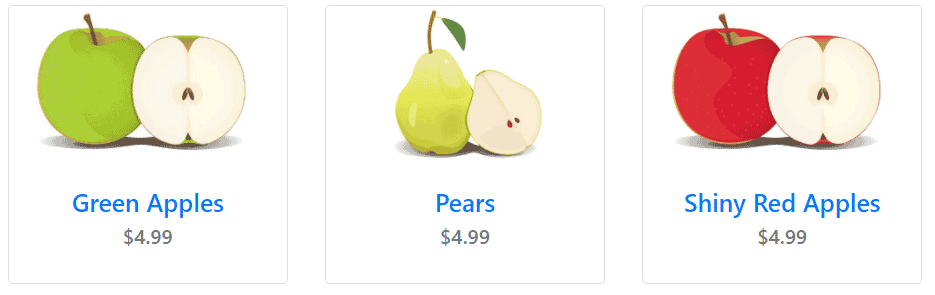
Upload the new /templates/override/includes/components/ to your server.
Reload the shop page to see the change:

Please visit again soon for additions and changes
Phoenix Cart User Guide, like CE Phoenix Cart, is free to use but is maintained by unpaid volunteers.
All other content is the reserved Intellectual Property and Copyright of phoenixcart.org
