Difference between revisions of "Server Info"
From Phoenix Cart User Guide
PeterRobert (talk | contribs) |
PeterRobert (talk | contribs) |
||
| (5 intermediate revisions by the same user not shown) | |||
| Line 1: | Line 1: | ||
| − | < | + | <div class="btn btn-grey btn-back">{{#fas:arrow-left}} Back</div> <div class="btn btn-grey btn-admin">{{#fas:cog}} Administration</div> |
| − | < | ||
<hr> | <hr> | ||
| − | From admin go to '''Tools → Server Info''' to see this at the top of the page: | + | From admin go to [[File:adminnavbartools.png|link=]] '''Tools → Server Info''' to see this at the top of the page: |
<div class="mainpage_box"> | <div class="mainpage_box"> | ||
| − | [[File:serverinfo.png|link= | + | [[File:serverinfo.png|link=]] |
</div> | </div> | ||
| − | *This will show information that may be requested if you seek help from a developer. | + | *This will show information about your host server that may be requested if you seek help from a developer. |
| − | * | + | *To send the information to a developer, click <span class="btn-red">Export</span> to see this: |
| + | <div class="mainpage_box"> | ||
| + | [[File:serverinfo1.png|link=]] | ||
| + | </div> | ||
| + | |||
| + | *Click <span class="btn-green">Save to your Hard Drive</span> to save a text document that you can then send to your developer. | ||
<hr> | <hr> | ||
| − | + | ||
{{Contribute}} | {{Contribute}} | ||
Latest revision as of 06:17, 25 March 2021
Back
Administration
From admin go to  Tools → Server Info to see this at the top of the page:

- This will show information about your host server that may be requested if you seek help from a developer.
- To send the information to a developer, click Export to see this:
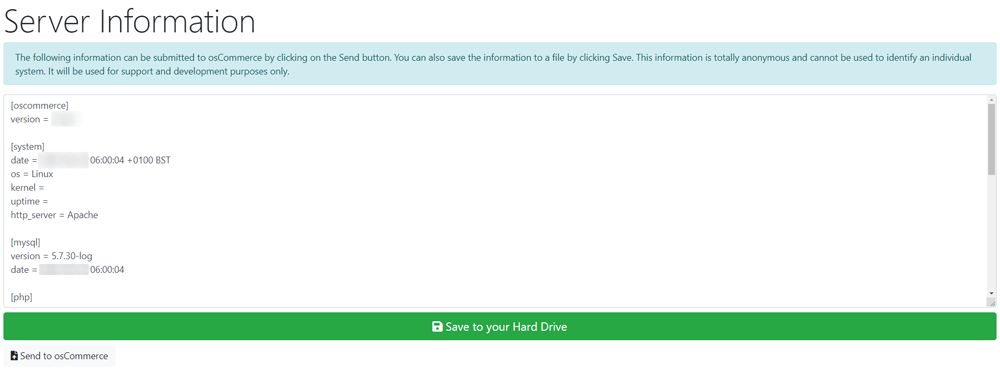
- Click Save to your Hard Drive to save a text document that you can then send to your developer.
Phoenix Cart User Guide, like CE Phoenix Cart, is free to use but is maintained by unpaid volunteers.
All other content is the reserved Intellectual Property and Copyright of phoenixcart.org
