Difference between revisions of "Advert Manager"
From Phoenix Cart User Guide
PeterRobert (talk | contribs) |
PeterRobert (talk | contribs) |
||
| Line 8: | Line 8: | ||
Adverts created here can be used in modules that display them. | Adverts created here can be used in modules that display them. | ||
| − | |||
| − | Enter a title for the | + | *Enter a Title in the '''Title''' input box - this is a short title that could be used in modules or add-ons that will display the advert (so ignore the help text!). |
| + | *Enter a URL in the '''URL''' input box if a link in the advert is required, | ||
| + | *Enter a Fragment in the '''Fragment''' input box if that is required. | ||
| + | *Enter a sort order in the '''Sort Order''' input box, '''10''' for example. | ||
| + | *Choose a previously created group from the '''Group''' drop-down input box or create a new one. | ||
| + | *Click '''Browse''' to upload an image '''OR enter local file name'''. | ||
| + | *Enter the text you want in the '''HTML Text''' input box. | ||
| + | *Click <span class="btn-green">Save</span> | ||
| + | |||
It is a very versatile tool | It is a very versatile tool | ||
Revision as of 13:51, 9 November 2021
Back
Home
From admin go to  Tools → Advert Manager and click New Advert to see this:
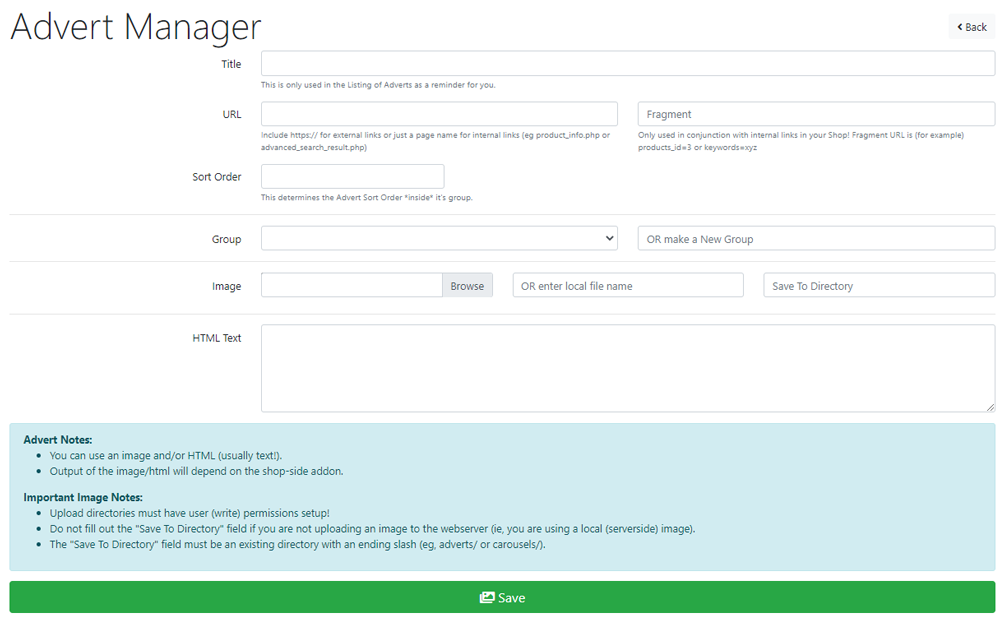
Adverts created here can be used in modules that display them.
- Enter a Title in the Title input box - this is a short title that could be used in modules or add-ons that will display the advert (so ignore the help text!).
- Enter a URL in the URL input box if a link in the advert is required,
- Enter a Fragment in the Fragment input box if that is required.
- Enter a sort order in the Sort Order input box, 10 for example.
- Choose a previously created group from the Group drop-down input box or create a new one.
- Click Browse to upload an image OR enter local file name.
- Enter the text you want in the HTML Text input box.
- Click Save
It is a very versatile tool
There are no modules to display adverts included in CE Phoenix Cart.

Please visit again soon for additions and changes
Phoenix Cart User Guide, like CE Phoenix Cart, is free to use but is maintained by unpaid volunteers.
All other content is the reserved Intellectual Property and Copyright of phoenixcart.org
