Difference between revisions of "Set up Zones"
PeterRobert (talk | contribs) |
PeterRobert (talk | contribs) |
||
| (40 intermediate revisions by the same user not shown) | |||
| Line 1: | Line 1: | ||
| − | [[File:zones.png]] | + | <div class="btn btn-grey btn-back">{{#fas:arrow-left}} Back</div> <div class="btn btn-grey btn-setup-shop">{{#fas:play-square}} [[Set_Up_Store|Set Up Store]]</div> |
| − | < | + | <hr> |
| + | __TOC__ | ||
| + | __FORCETOC__ | ||
| + | From admin dashboard go to [[File:adminnavbartax.png|link=]] '''Locations/Taxes → Zones''' - you will see this: | ||
| + | <div class="mainpage_box"> | ||
| + | [[File:zones.jpg|link=|1500px]] | ||
| + | </div> | ||
| + | ==='''Zones'''=== | ||
| + | These are defined as being part of a country e.g. a State or Province. | ||
| + | |||
| + | They are used when setting up Taxes, Payment and Shipping options and other modules. | ||
| + | |||
| + | CE Phoenix Cart has Zones already defined for Austria, Canada, Germany, Spain, Switzerland and U.S.A. | ||
| + | |||
| + | |||
| + | ---- | ||
| + | ==='''New Zone'''=== | ||
| + | |||
| + | If your location is different, or you will be selling to locations other than those already defined, you can define them here. | ||
| + | |||
| + | *Click <span class="btn-red">New Zone</span> | ||
| + | *Enter the '''Zones Name''' and '''Zones Code''' (if the country for that Zone uses one) | ||
| + | *Select a '''Country''' from the drop down menu. | ||
| + | *Click <span class="btn-green">Save</span> | ||
| + | *Repeat for every Zone in the Country. | ||
| + | |||
| + | |||
| + | ---- | ||
| + | |||
| + | |||
| + | CE Phoenix Cart has every country installed by default. | ||
| + | |||
| + | It is advisable to disable or delete the countries to which you will not be selling - from admin go to [[File:adminnavbartax.png|link=]] '''Locations/Taxes → Countries''' - see <big>'''[[Countries]]'''</big> | ||
| + | |||
| + | |||
| + | <!-- | ||
| + | ---- | ||
| + | |||
| + | |||
| + | <BIG>'''[https://www.youtube.com/watch?v=5tg4oiK-96w Watch on YouTube]'''</BIG> | ||
| + | --> | ||
| + | |||
| + | |||
| + | <hr> | ||
| + | <span class="btn-grey btn-prev">{{#fas:arrow-left}} [[Set_up_Countries|Previous Step]]</span> | ||
| + | <span class="btn-grey btn-next">[[Set_up_Store_Details|Next Step]] {{#fas:arrow-right}}</span> | ||
| + | <hr> | ||
| + | {{Pro}} | ||
| + | {{Forum}} | ||
| + | {{Contribute}} | ||
Latest revision as of 08:25, 6 September 2024
From admin dashboard go to  Locations/Taxes → Zones - you will see this:
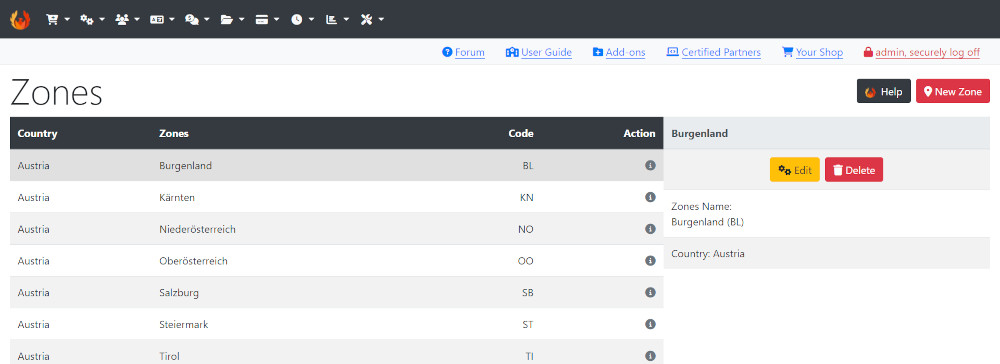
Zones
These are defined as being part of a country e.g. a State or Province.
They are used when setting up Taxes, Payment and Shipping options and other modules.
CE Phoenix Cart has Zones already defined for Austria, Canada, Germany, Spain, Switzerland and U.S.A.
New Zone
If your location is different, or you will be selling to locations other than those already defined, you can define them here.
- Click New Zone
- Enter the Zones Name and Zones Code (if the country for that Zone uses one)
- Select a Country from the drop down menu.
- Click Save
- Repeat for every Zone in the Country.
CE Phoenix Cart has every country installed by default.
It is advisable to disable or delete the countries to which you will not be selling - from admin go to Locations/Taxes → Countries - see Countries
Many Addons and Extensions available in the CE Phoenix Cart Addons Library
If help is needed, support is available in the CE Phoenix Cart Support Forum
Phoenix Cart User Guide, like CE Phoenix Cart, is free to use but is maintained by unpaid volunteers.
All other content is the reserved Intellectual Property and Copyright of phoenixcart.org
