Difference between revisions of "Order Total"
From Phoenix Cart User Guide
PeterRobert (talk | contribs) |
PeterRobert (talk | contribs) |
||
| (4 intermediate revisions by the same user not shown) | |||
| Line 1: | Line 1: | ||
<div class="btn btn-grey btn-back">{{#fas:arrow-left}} Back</div> <div class="btn btn-grey btn-admin">{{#fas:cog}} Administration</div> | <div class="btn btn-grey btn-back">{{#fas:arrow-left}} Back</div> <div class="btn btn-grey btn-admin">{{#fas:cog}} Administration</div> | ||
<hr> | <hr> | ||
| + | __TOC__ | ||
| + | __FORCETOC__ | ||
From admin go to [[File:adminnavbarmod.png|link=]] '''Modules → Order Total''' - you will see this: | From admin go to [[File:adminnavbarmod.png|link=]] '''Modules → Order Total''' - you will see this: | ||
<div class="mainpage_box"> | <div class="mainpage_box"> | ||
| − | [[File:modulesordertotal. | + | [[File:modulesordertotal.jpg|link=|1500px]] |
</div> | </div> | ||
| − | + | This list shows the order total modules installed by default. | |
| − | |||
| + | These perform the calculations shown on the checkout confirmation page, the last page of the store checkout procedure. | ||
| − | |||
| − | |||
| − | |||
| − | |||
| − | |||
| − | |||
| − | |||
| − | |||
---- | ---- | ||
| − | + | ==='''Free Delivery'''=== | |
| − | + | '''Delivery''' can be edited to enable '''Free Delivery''' over a specified order amount. | |
| − | + | *Click '''Delivery''' in the modules column list to select it. | |
| − | + | *Click it again to open the edit panel. | |
| − | + | *Change '''Allow Free Delivery''' to '''true''' | |
| − | + | *Enter a value for '''Free Delivery For Orders Over''' | |
| − | + | *Change '''Provide Free Delivery For Orders Made''' to specify if free delivery applies to orders '''national''', '''international''' or '''both'''. | |
| − | + | *Click <span class="btn-green">Save</span> | |
| − | |||
| − | |||
| − | |||
| − | |||
| − | |||
| − | |||
| − | * | ||
| − | |||
| − | |||
| − | |||
<hr> | <hr> | ||
| − | {{ | + | {{Pro}} |
| + | {{Forum}} | ||
{{Contribute}} | {{Contribute}} | ||
Latest revision as of 09:47, 24 November 2024
Back
Administration
From admin go to  Modules → Order Total - you will see this:
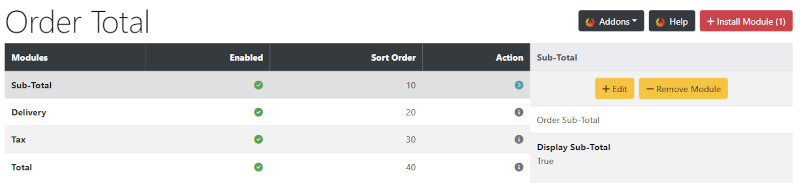
This list shows the order total modules installed by default.
These perform the calculations shown on the checkout confirmation page, the last page of the store checkout procedure.
Free Delivery
Delivery can be edited to enable Free Delivery over a specified order amount.
- Click Delivery in the modules column list to select it.
- Click it again to open the edit panel.
- Change Allow Free Delivery to true
- Enter a value for Free Delivery For Orders Over
- Change Provide Free Delivery For Orders Made to specify if free delivery applies to orders national, international or both.
- Click Save
Many Addons and Extensions available in the CE Phoenix Cart Addons Library
If help is needed, support is available in the CE Phoenix Cart Support Forum
Phoenix Cart User Guide, like CE Phoenix Cart, is free to use but is maintained by unpaid volunteers.
All other content is the reserved Intellectual Property and Copyright of phoenixcart.org
