Difference between revisions of "Security Directory Permissions"
PeterRobert (talk | contribs) (Add suggestion for comments about servers) |
PeterRobert (talk | contribs) |
||
| Line 6: | Line 6: | ||
</div> | </div> | ||
| − | On a | + | This page checks how your server set-up affects how secure your files are. On PhoenixCart < 1.0.8.15, the two columns "Writable" and "Recommended" should have the same symbol to indicate correct set-up. On PhoenixCart >=1.0.8.15 a green symbol indicates correct set-up, while a red symbol means you should change things in your hosting to strengthen your security. |
| − | + | Often, on a Linux-based system, correct permissions for non-writable files are 0644, while folders are 0755. | |
| − | |||
| − | |||
| − | |||
| − | |||
| − | |||
| − | |||
| − | |||
| − | |||
| − | |||
| − | |||
| − | |||
| − | |||
| − | |||
| − | |||
| − | + | Note that webservers can be set up differently. | |
| − | + | Thus, 0664, 0644, 0640, 0460, 0444, 0440 or 0400 could be correct for non-writable files and 0775, 0755, 0750, 0570, 0555, 0550 or 0500 could be correct for non-writable folders. You can do trial and error or speak to your host to find the correct permissions for your set-up. | |
| − | + | ||
| − | + | If your server requires low permissions (04XX for files or 05XX for folders) to not be writable, you should instead get help from your host to make the server run as a different user from the FTP-user. You should also make your user separate from the user of other sites on the same server if possible. | |
| + | |||
| + | If you are on a dedicated server, you could further strengthen security by making admin run as a different user than catalog. This would make an eventual compromise of the catalog-server less impactful for you, as less harm can be done from there. | ||
| + | |||
| + | Obviously, nothing is really secure, if the keys are left in the locks, so make sure to keep your passwords strong and safe! | ||
| − | |||
| − | |||
| − | |||
| − | |||
| − | |||
| − | |||
| − | |||
| − | |||
| − | |||
| − | |||
| − | |||
| − | |||
| − | |||
| − | |||
| − | |||
| − | |||
| − | |||
| − | |||
| − | |||
| − | |||
| − | |||
| − | |||
| − | |||
| − | |||
| − | |||
| − | |||
| − | |||
| − | |||
| − | |||
| − | |||
| − | |||
| − | |||
| − | |||
| − | |||
| − | |||
| − | |||
| − | |||
| − | |||
| − | |||
| − | |||
| − | |||
<hr> | <hr> | ||
{{Page_In_Progress}} | {{Page_In_Progress}} | ||
{{Contribute}} | {{Contribute}} | ||
Latest revision as of 10:31, 22 February 2023
From admin go to  Tools → Security Directory Permissions to see similar to this:
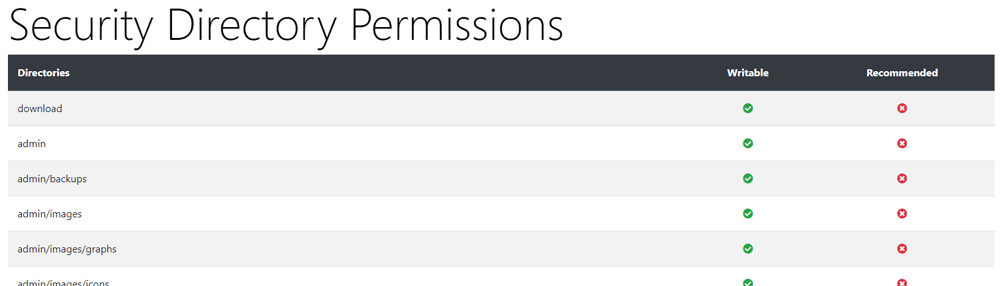
This page checks how your server set-up affects how secure your files are. On PhoenixCart < 1.0.8.15, the two columns "Writable" and "Recommended" should have the same symbol to indicate correct set-up. On PhoenixCart >=1.0.8.15 a green symbol indicates correct set-up, while a red symbol means you should change things in your hosting to strengthen your security.
Often, on a Linux-based system, correct permissions for non-writable files are 0644, while folders are 0755.
Note that webservers can be set up differently. Thus, 0664, 0644, 0640, 0460, 0444, 0440 or 0400 could be correct for non-writable files and 0775, 0755, 0750, 0570, 0555, 0550 or 0500 could be correct for non-writable folders. You can do trial and error or speak to your host to find the correct permissions for your set-up.
If your server requires low permissions (04XX for files or 05XX for folders) to not be writable, you should instead get help from your host to make the server run as a different user from the FTP-user. You should also make your user separate from the user of other sites on the same server if possible.
If you are on a dedicated server, you could further strengthen security by making admin run as a different user than catalog. This would make an eventual compromise of the catalog-server less impactful for you, as less harm can be done from there.
Obviously, nothing is really secure, if the keys are left in the locks, so make sure to keep your passwords strong and safe!

Please visit again soon for additions and changes
Phoenix Cart User Guide, like CE Phoenix Cart, is free to use but is maintained by unpaid volunteers.
All other content is the reserved Intellectual Property and Copyright of phoenixcart.org
