Difference between revisions of "How to Make a New Page"
From Phoenix Cart User Guide
PeterRobert (talk | contribs) |
PeterRobert (talk | contribs) |
||
| Line 25: | Line 25: | ||
*Find the '''privacy''' file. | *Find the '''privacy''' file. | ||
| − | + | <div class="mainpage_box"> | |
| + | [[File:Vscprivacylang.png|link=|1500px]] | ||
| + | </div> | ||
Revision as of 15:45, 27 November 2019
<historylink type="back">🠈 Back</historylink> 🠉 FAQS TIPS & TRICKS
It is a common requirement for shop owners to want additional information pages specific to their shop e.g. pages relating to products or services.
This is easily achieved by making a clone of an existing information page.
Each page has its own language file so a clone is made of both.
In this example a new information page is made by cloning the existing privacy.php information page.
- On your local computer, find and open the downloaded and unzipped (extracted) CE Phoenix folder or download and unzip a new one.
- Find the privacy file.
- Open the file in a file editor to see this:
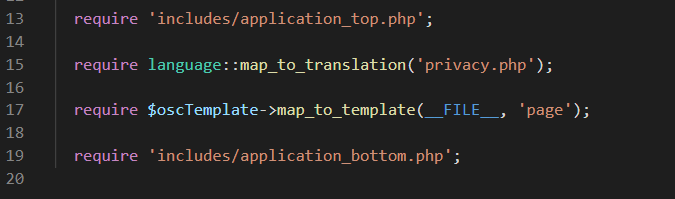
- There are only 2 references to the file name privacy - shown in the example on lines 15 and 17.
- Change both instances of privacy to the new file name - information is used here just as an example.
- In the file editor menu, go to and click File → Save as...
- Enter the new file name (information) and click Save
- Now back in the downloaded and unzipped (extracted) CE Phoenix folder, go to includes → languages → english
- Find the privacy file.
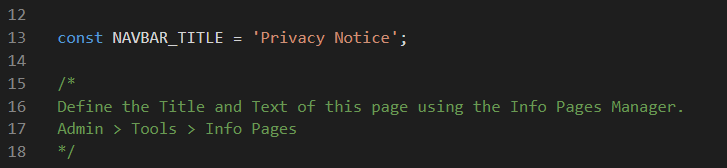

Please visit again soon for additions and changes
Phoenix Cart User Guide, like CE Phoenix Cart, is free to use but is maintained by unpaid volunteers.
All other content is the reserved Intellectual Property and Copyright of phoenixcart.org
