Difference between revisions of "Layout"
From Phoenix Cart User Guide
PeterRobert (talk | contribs) (Created page with "<div class="btn btn-grey btn-back">{{#fas:arrow-left}} Back</div> <div class="btn btn-grey btn-admin">{{#fas:cog}} Administration</div> <hr> From admin go to File:adminnavba...") |
PeterRobert (talk | contribs) |
||
| Line 1: | Line 1: | ||
<div class="btn btn-grey btn-back">{{#fas:arrow-left}} Back</div> <div class="btn btn-grey btn-admin">{{#fas:cog}} Administration</div> | <div class="btn btn-grey btn-back">{{#fas:arrow-left}} Back</div> <div class="btn btn-grey btn-admin">{{#fas:cog}} Administration</div> | ||
<hr> | <hr> | ||
| − | From admin go to [[File:adminnavbarmod.png|link=]] '''Modules → | + | From admin go to [[File:adminnavbarmod.png|link=]] '''Modules → Layout''' - you will see this: |
<div class="mainpage_box"> | <div class="mainpage_box"> | ||
[[File:modulescontent.png|link=|1500px]] | [[File:modulescontent.png|link=|1500px]] | ||
</div> | </div> | ||
| − | *This list shows all the | + | *This list shows all the layout modules installed in the shop by default. |
*They are sorted into '''Groups''' according to on which page they display. | *They are sorted into '''Groups''' according to on which page they display. | ||
*They are also sorted by the '''Sort Order''' in which they are displayed on the page in relation to each other. | *They are also sorted by the '''Sort Order''' in which they are displayed on the page in relation to each other. | ||
| Line 15: | Line 15: | ||
*Most groups are self explanatory. | *Most groups are self explanatory. | ||
| − | |||
| − | |||
| − | |||
| − | |||
| − | |||
| − | |||
| − | |||
| − | |||
| − | |||
| − | |||
**'''product_info''' refers to a page that shows a single product. | **'''product_info''' refers to a page that shows a single product. | ||
| − | + | ||
Revision as of 17:16, 13 November 2022
Back
Administration
From admin go to  Modules → Layout - you will see this:
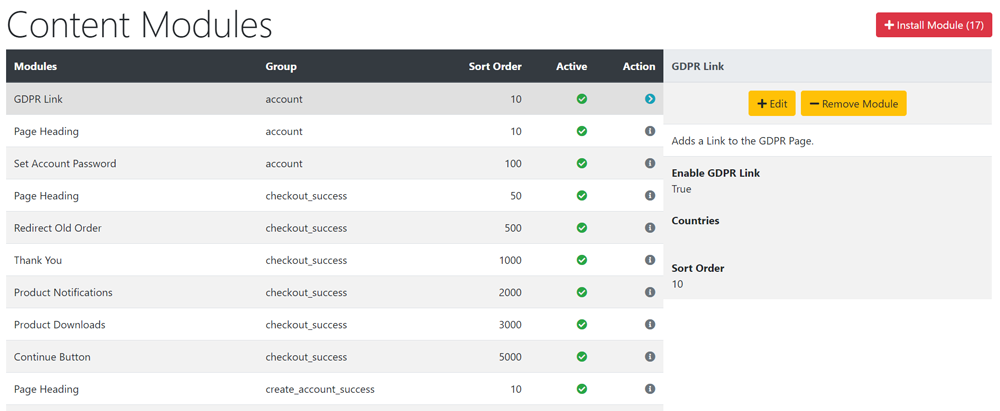
- This list shows all the layout modules installed in the shop by default.
- They are sorted into Groups according to on which page they display.
- They are also sorted by the Sort Order in which they are displayed on the page in relation to each other.
- The Active column shows if they are enabled (currently displayed) on the page - green if they are enabled - red if they are disabled.
- Most groups are self explanatory.
- product_info refers to a page that shows a single product.
- Click the item in the Modules column list to select it.
- Click Edit to open the edit panel.
- Change the setting for Enable... Module to False.
- Click Save
- The Active column button will change from green to red to show it has been disabled.
- The display width of most content modules can be changed.
- Click the item in the Modules column list to select it.
- Click Edit to open the edit panel.
- Change the Content Width setting according to the instructions shown.
- Click Save
- To install additional content modules:
- Click Install Module shown top right of screen - the number shown next to it indicates the number of modules available.
- Click a module to use from the list.
- Click Install Module
- Click Edit
- Choose a Content Width setting according to the instructions shown.
- Enter a Sort Order value to order the display of the module in relation to the other modules in the same group.
- Do not leave 0 as the Sort Order on modules as it can cause problems.
- You can give it any number but note and follow the convention used as default which is helpful.
- Click Save
Tip:
If you don't want to show a module, you can either disable (hide) it or remove (uninstall) it.
When playing with the design, it's a good option to disable it, as it saves the settings it has been given, meaning it will be exactly the same as it was if you choose to enable it again later.
However, this also means that it is loaded completely with every page, which in extreme circumstances might slow down your website
If you are sure you don't want to use a module, it is better to remove it than to hide it.

Please visit again soon for additions and changes
Phoenix Cart User Guide, like CE Phoenix Cart, is free to use but is maintained by unpaid volunteers.
All other content is the reserved Intellectual Property and Copyright of phoenixcart.org
