Difference between revisions of "Countries"
From Phoenix Cart User Guide
PeterRobert (talk | contribs) |
PeterRobert (talk | contribs) |
||
| Line 19: | Line 19: | ||
1 | 1 | ||
| + | |||
name | name | ||
| + | |||
streets | streets | ||
| + | |||
city, postcode | city, postcode | ||
| + | |||
state, country | state, country | ||
| + | |||
2 | 2 | ||
| + | |||
name | name | ||
| + | |||
streets | streets | ||
| + | |||
city, state postcode | city, state postcode | ||
| + | |||
country | country | ||
| + | |||
3 | 3 | ||
| + | |||
name | name | ||
| + | |||
streets | streets | ||
| + | |||
city | city | ||
| + | |||
postcode - state, country | postcode - state, country | ||
| + | |||
4 | 4 | ||
| + | |||
name | name | ||
| + | |||
streets | streets | ||
| + | |||
city (postcode) | city (postcode) | ||
| + | |||
country | country | ||
| + | |||
5 | 5 | ||
| + | |||
name | name | ||
| + | |||
streets | streets | ||
| + | |||
postcode city | postcode city | ||
| + | |||
country | country | ||
Revision as of 07:32, 14 July 2022
Back
Administration
From admin dashboard go to  Locations & Taxes → Countries to see this:
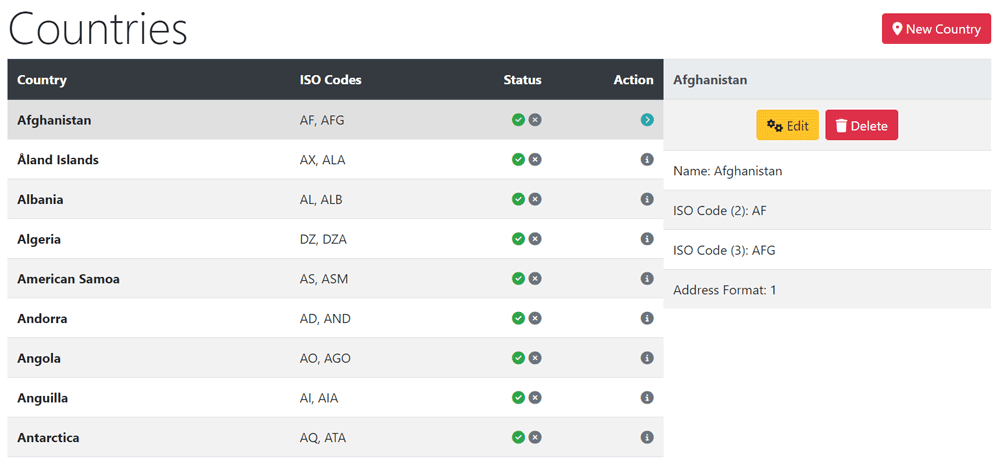
- Phoenix has every? country installed by default.
- You might want to remove countries to which you will not be selling.
- Click a country in the list to select it.
- Click Delete
- Click Delete again to confirm deletion.
The Address Format can be changed for each country by choosing a number from the drop down list. The formats are automatically created when Phoenix cart is installed and are in the address_format database table. If none of the formats suit your individual use case then an additional Address
1
name
streets
city, postcode
state, country
2
name
streets
city, state postcode
country
3
name
streets
city
postcode - state, country
4
name
streets
city (postcode)
country
5
name
streets
postcode city
country
