Difference between revisions of "Security Directory Permissions"
From Phoenix Cart User Guide
PeterRobert (talk | contribs) |
PeterRobert (talk | contribs) (Add suggestion for comments about servers) |
||
| Line 8: | Line 8: | ||
On a Linux-based system, the general rule of thumb is 755 for directories, 644 for files | On a Linux-based system, the general rule of thumb is 755 for directories, 644 for files | ||
| + | <!-- | ||
| + | Note that servers can be set up in different manners. | ||
| + | Commonly for shared servers, to protect the server, servers will set both the user and php as owner. | ||
| + | While this means that another infected site on your server would be unable to infect your site, it also means that should your site be hacked, the hacker will be able to use chmod() to alter all your files. | ||
| + | PhoenixCart has no known vulnerabilities, but you must make sure to keep your passwords safe - especially for ftp and your host! | ||
| + | The reason to mention this here is that this page may show all files and directories with a red lock, to show that they are writable, but are not supposed to be. | ||
| + | Thus, if you are on a server where php runs as owner, this page may not be helpful. | ||
| + | To test whether php is owner or not, you could try making a new file in the root of you store called testchmod.php with the following content: | ||
| + | <nowiki> | ||
| + | <? | ||
| + | /* | ||
| + | credit to Te Taipo, @Taipo for this exact code | ||
| + | */ | ||
| + | // change the file name to whatever file you are testing | ||
| + | $testfile = "testchmod.php"; | ||
| + | |||
| + | error_reporting(0); | ||
| + | $i=0; | ||
| + | $content = NULL; | ||
| + | $writeperms = substr( decoct( fileperms( $testfile ) ),3 ); | ||
| + | |||
| + | if ($writeperms <= 665) { | ||
| + | if ( !chmod( $testfile, 0666 ) ) { | ||
| + | $i++; | ||
| + | } else { | ||
| + | $msg .= "able to chmod<br>"; | ||
| + | } | ||
| + | } else { | ||
| + | $msg .= $testfile . " is already chmod to " . $writeperms . "<br>"; | ||
| + | } | ||
| + | if (!$fp = fopen($testfile, 'r')) { | ||
| + | $i++; | ||
| + | } else { | ||
| + | $content = stream_get_contents($fp, -1, 0); | ||
| + | fclose($fp); | ||
| + | $msg .= "able to read content of " . $testfile . "<br>"; | ||
| + | } | ||
| + | if ( !$fp = @fopen( $testfile, "w" ) ) { | ||
| + | $i++; | ||
| + | } else { | ||
| + | $msg .= "able to open " . $testfile . "<br>"; | ||
| + | } | ||
| + | if ( fwrite( $fp, $content ) === FALSE ) { | ||
| + | $i++; | ||
| + | } else { | ||
| + | $msg .= "able to write to file " . $testfile . "<br>"; | ||
| + | } | ||
| + | if ( !fclose( $fp ) ) { | ||
| + | $i++; | ||
| + | } else { | ||
| + | $msg .= "able to close file " . $testfile . "<br>"; | ||
| + | } | ||
| + | if( $i > 0 ) { | ||
| + | echo $testfile . " is Write-Protected "; | ||
| + | } else { | ||
| + | echo $msg; | ||
| + | } | ||
| + | ?> | ||
| + | </nowiki> | ||
| + | Then browse to it (yousite.com/testchmod.php) and see the result. | ||
| + | Make sure you delete the file afterwards! | ||
| + | --> | ||
<hr> | <hr> | ||
{{Page_In_Progress}} | {{Page_In_Progress}} | ||
{{Contribute}} | {{Contribute}} | ||
Revision as of 09:49, 27 January 2023
Back
Administration
From admin go to  Tools → Security Directory Permissions to see similar to this:
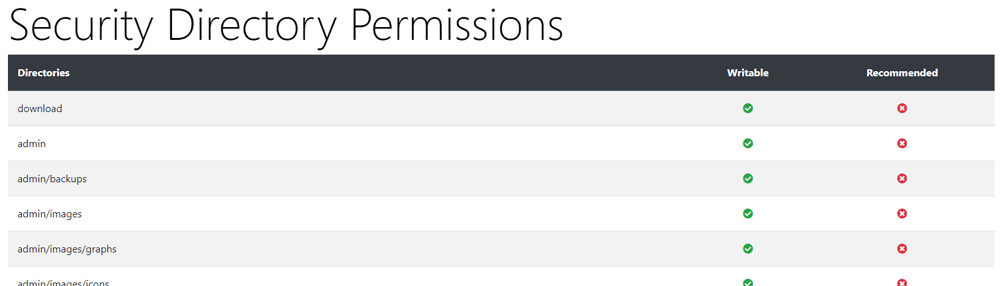
On a Linux-based system, the general rule of thumb is 755 for directories, 644 for files

Please visit again soon for additions and changes
Phoenix Cart User Guide, like CE Phoenix Cart, is free to use but is maintained by unpaid volunteers.
All other content is the reserved Intellectual Property and Copyright of phoenixcart.org
