Maximum Values
From Phoenix Cart User Guide
Revision as of 18:05, 15 December 2019 by PeterRobert (talk | contribs)
<historylink type="back">🠈 Back</historylink> 🠉 ADMINISTRATION
From admin go to Configuration → Maximum Values - you will see this:
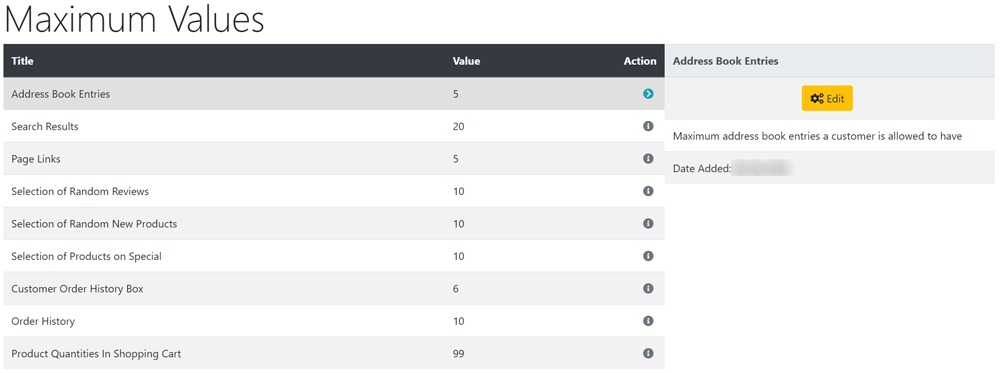
All the preset values can be left as they are - they do not need to be changed unless you have specific requirements.
To change any setting:
- Click the item in the Title column list to select it.
- Click it again to edit.
- Change the settings in the edit panel.
- Click Save
- Address Book Entries
- Maximum number of address book entries a customer is allowed to have.
- Search Results
- Number of products to list per page in search results and product listings e.g. when a product category is clicked.
- Page Links
- Number of number links used for page sets if your product listings span multiple pages e.g. if set to 5, there will be five links numbered 1 to 5
- The position of these links can be changed - go to Configuration → Product listing → Location of Prev/Next Navigation Bar (1-top, 2-bottom, 3-both)
- Special Products
- Ignore - moved - defunct.
- Manufacturers List
- When the number of manufacturers exceeds this number, a drop-down list will be displayed instead of the default list in the manufacturers box.
- Manufacturers Select Size
- When this value is 1 the classic drop-down list will be used for the manufacturers box. Otherwise, a list-box with the specified number of rows will be displayed.
- Length of Manufacturers Name
- Maximum length of manufacturers name to display in the manufacturers box.
- New Reviews
- Maximum number of new reviews to display
- Selection of Random Reviews
- How many records to select from to choose one random product review.
- Selection of Random New Products
- How many records to select from to choose one random new product to display.
- Selection of Products on Special
- How many records to select from to choose one random product special to display.
- Categories To List Per Row
- How many categories to list per row.
- New Products Listing
- Maximum number of new products to display in new products page.
- Best Sellers
- Maximum number of best sellers to display.
- Customer Order History Box
- Maximum number of products to display in the customer order history box.
- Order History
- Maximum number of orders to display in the order history page in the customers account.
- Product Quantities In Shopping Cart
- Maximum number of each product that can be added to the shopping cart (0 for no limit)

Please visit again soon for additions and changes
Phoenix Cart User Guide, like CE Phoenix Cart, is free to use but is maintained by unpaid volunteers.
All other content is the reserved Intellectual Property and Copyright of phoenixcart.org
