Product Listing
From Phoenix Cart User Guide
Revision as of 16:24, 20 August 2020 by PeterRobert (talk | contribs)
<historylink type="back">🠈 Back</historylink> 🠉 ADMINISTRATION
From admin go to  Configuration → Product Listing to see this:
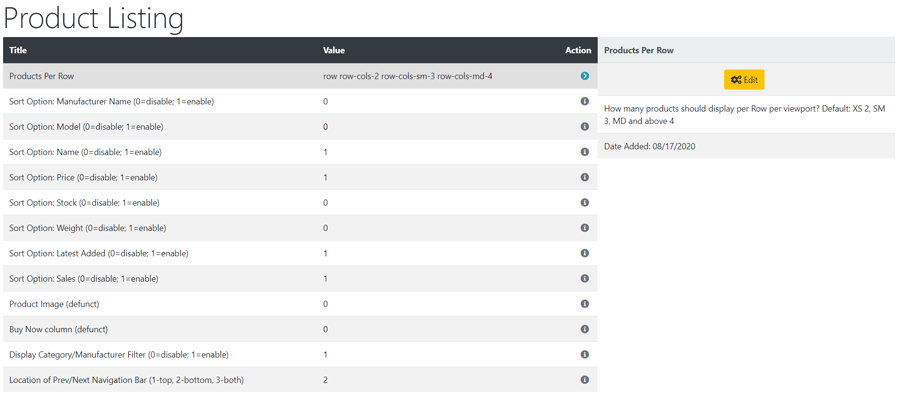
Phoenix looks great as it is but there are options to change the layout if required. To change any setting:
- Click the item in the Title column list to select it.
- Click it again to edit.
- Change the settings in the edit panel.
- Click Save
- Products Per Row
- The product listing display can be changed - like it says - Default: XS 2, SM 3, MD and above 4.
- It's best to have a play with this to achieve your preferred display.
- These settings enable/disable the menu items that show in the Sort By drop down menu shown on the product listing.
- Sort Option: Manufacturer Name (0=disable; 1=enable)
- Sort Option: Model (0=disable; 1=enable)
- Sort Option: Name (0=disable; 1=enable)
- Sort Option: Price (0=disable; 1=enable)
- Sort Option: Stock (0=disable; 1=enable)
- Sort Option: Weight (0=disable; 1=enable)
- Sort Option: Latest Added (0=disable; 1=enable)
- Sort Option: Sales (0=disable; 1=enable)
- Product Image (defunct)
- Buy Now column (defunct)
- Display Category/Manufacturer Filter (0=disable; 1=enable)
- Note that Manufacturers could also be used as a secondary method of categorising products.
- Location of Prev/Next Navigation Bar (1-top, 2-bottom, 3-both) - note 0 to disable.
- The number of pages displayed in the page set can be changed - go to Configuration → Maximum Values → Page Links
Tip: This whole Sort By/Filter section can be disabled by entering the following in user.css
div.alert-filters { display: none !important; }

Please visit again soon for additions and changes
Phoenix Cart User Guide, like CE Phoenix Cart, is free to use but is maintained by unpaid volunteers.
All other content is the reserved Intellectual Property and Copyright of phoenixcart.org
