Difference between revisions of "Set up Customer Details"
From Phoenix Cart User Guide
PeterRobert (talk | contribs) |
PeterRobert (talk | contribs) |
||
| Line 6: | Line 6: | ||
[[File:customerdetails.png|link=|1500px]] | [[File:customerdetails.png|link=|1500px]] | ||
</div> | </div> | ||
| − | Phoenix has the information requested from customers when they create an account (shown above) set to | + | CE Phoenix has the information requested from customers when they create an account (shown above) set to '''true''' by default. |
Change the settings to '''false''' as required. | Change the settings to '''false''' as required. | ||
Revision as of 14:25, 8 November 2019
<historylink type="back">🠈 Back</historylink> 🠉 SET UP SHOP
From admin go to Configuration → Customer Details - you will see this:
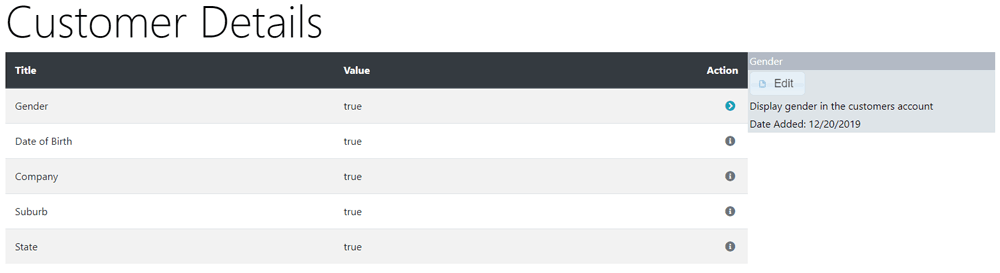
CE Phoenix has the information requested from customers when they create an account (shown above) set to true by default.
Change the settings to false as required.
Phoenix Cart User Guide, like CE Phoenix Cart, is free to use but is maintained by unpaid volunteers.
All other content is the reserved Intellectual Property and Copyright of phoenixcart.org
