Difference between revisions of "How to Change Text"
PeterRobert (talk | contribs) |
PeterRobert (talk | contribs) |
||
| Line 11: | Line 11: | ||
Sometimes it can be difficult to find which language file contains the text. | Sometimes it can be difficult to find which language file contains the text. | ||
| − | To find text in a language file, use the search facility in file editing software to search your backup folder/directory - see:- <big>'''[[How to Back Up]]'''</big> and <big>'''[[Must Have Tools]]'''</big> - or at Github, where the repository for the code for CE Phoenix Cart is stored - https://github.com/CE-PhoenixCart/PhoenixCart | + | To find text in a language file, use the search facility in file editing software to search your backup folder/directory - see:- <big>'''[[How to Back Up]]'''</big> and <big>'''[[Must Have Tools]]'''</big> - or at Github, where the repository for the code for CE Phoenix Cart is stored - '''https://github.com/CE-PhoenixCart/PhoenixCart''' |
So, using the CE Phoenix Cart Github Repository to search, the search box can be seen at the top of the page. | So, using the CE Phoenix Cart Github Repository to search, the search box can be seen at the top of the page. | ||
| Line 27: | Line 27: | ||
</div> | </div> | ||
| − | Which gives | + | Which gives a few results: |
<div class="mainpage_box"> | <div class="mainpage_box"> | ||
| Line 34: | Line 34: | ||
| − | + | *A quick look at the results shows an obvious file: | |
| − | * | + | ** '''includes/languages/english/modules/notifications/n_create_account.php''' |
*In a multi language store, the same file will also be in other language directories, for example, at '''includes/languages/otherLanguage/modules/notifications/n_create_account.php''' | *In a multi language store, the same file will also be in other language directories, for example, at '''includes/languages/otherLanguage/modules/notifications/n_create_account.php''' | ||
*Backup any files before making changes. | *Backup any files before making changes. | ||
Revision as of 10:22, 16 September 2024
Text can be changed in a language file.
As an example here, the text shown in the e-mail notification that is sent to the customer automatically after registering on the website.
Often, the language file is associated with the module that uses it.
In this case, it is a notification module, so the language file will be found in /includes/languages/english/modules/notifications/, specifically, n_create_account.php
Sometimes it can be difficult to find which language file contains the text.
To find text in a language file, use the search facility in file editing software to search your backup folder/directory - see:- How to Back Up and Must Have Tools - or at Github, where the repository for the code for CE Phoenix Cart is stored - https://github.com/CE-PhoenixCart/PhoenixCart
So, using the CE Phoenix Cart Github Repository to search, the search box can be seen at the top of the page.

A test purchase will have been made and it will be seen that the e-mail starts with Welcome to
So, search for Welcome to and click on the results for Search in this repository.

Which gives a few results:
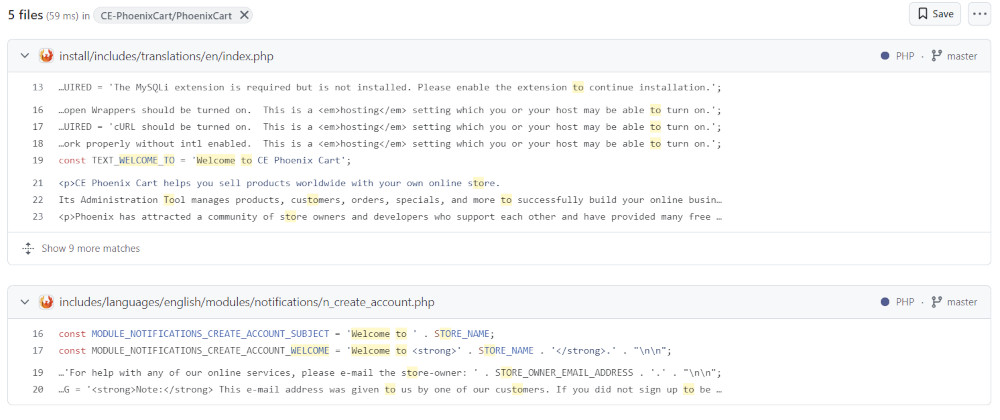
- A quick look at the results shows an obvious file:
- includes/languages/english/modules/notifications/n_create_account.php
- In a multi language store, the same file will also be in other language directories, for example, at includes/languages/otherLanguage/modules/notifications/n_create_account.php
- Backup any files before making changes.
- This language file in your backup directory could be changed and uploaded to overwrite the one on your server or the file on the server could be edited.
- Alternatively, find the language file in admin Tools → Define Languages list - in this example the file is modules/notifications/n_create_account.php.
- Click to open, make changes to the text - ensure you only change the text and not any code or punctuation marks that may also be part of the code.
- Click Save.
- Check and test the shop.
- The override Template was introduced in v1.0.7.14 which allows copies of edited files to be saved there to prevent them be overwritten in updates.
- So, in this example, open the file includes/languages/english/modules/notifications/n_create_account.php
- Save a copy to templates/override/includes/languages/english/modules/notifications/
- New folders might need to be created in the override template to create this folder structure.
- Open, edit and save the new file templates/override/includes/languages/english/modules/notifications/n_create_account.php
See:- How to Use a Template
Phoenix Cart User Guide, like CE Phoenix Cart, is free to use but is maintained by unpaid volunteers.
All other content is the reserved Intellectual Property and Copyright of phoenixcart.org
