Difference between revisions of "Products Attributes"
From Phoenix Cart User Guide
PeterRobert (talk | contribs) |
PeterRobert (talk | contribs) |
||
| Line 2: | Line 2: | ||
<span class="btn-grey" style="color:#0088dd;">'''[[ADMINISTRATION|🠉 ADMINISTRATION]]'''</span> | <span class="btn-grey" style="color:#0088dd;">'''[[ADMINISTRATION|🠉 ADMINISTRATION]]'''</span> | ||
<hr> | <hr> | ||
| + | |||
From admin go to '''Catalog → Products Attributes''' - you will see this: | From admin go to '''Catalog → Products Attributes''' - you will see this: | ||
| Line 28: | Line 29: | ||
*Click <span class="btn-blue">Insert</span> | *Click <span class="btn-blue">Insert</span> | ||
*Repeat for each Option Name and Option Value you wish to apply to a product. | *Repeat for each Option Name and Option Value you wish to apply to a product. | ||
| + | |||
<hr> | <hr> | ||
| + | |||
| + | |||
If digital downloads are being sold - see <big>'''[[Download]]'''</big> | If digital downloads are being sold - see <big>'''[[Download]]'''</big> | ||
Revision as of 18:01, 15 December 2019
<historylink type="back">🠈 Back</historylink> 🠉 ADMINISTRATION
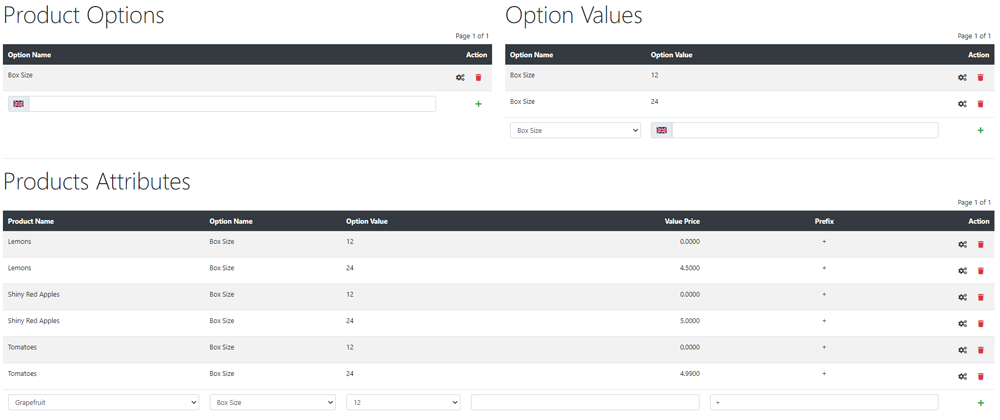
From admin go to Catalog → Products Attributes - you will see this:
Product Options
- Enter a new Option Name in the input box next to en: (english)
- Click Insert
Option Values
- Choose an Option Name from the pull down menu.
- Enter an Option Value in the input box next to en: (english)
- Click Insert
- Repeat to assign additional Option Values to Option Names.
Products Attributes
- Choose a Product Name from the pull down menu.
- Choose an Option Name from the pull down menu.
- Choose an Option Value from the pull down menu.
- Enter a net price adjustment in the Value Price input box.
- Enter a + or - prefix in the Prefix input box to add or subtract the price adjustment from the product price.
- Click Insert
- Repeat for each Option Name and Option Value you wish to apply to a product.
If digital downloads are being sold - see Download
Phoenix Cart User Guide, like CE Phoenix Cart, is free to use but is maintained by unpaid volunteers.
All other content is the reserved Intellectual Property and Copyright of phoenixcart.org
