Set up Currencies
From admin dashboard go to  Localization → Currencies - you will see this:
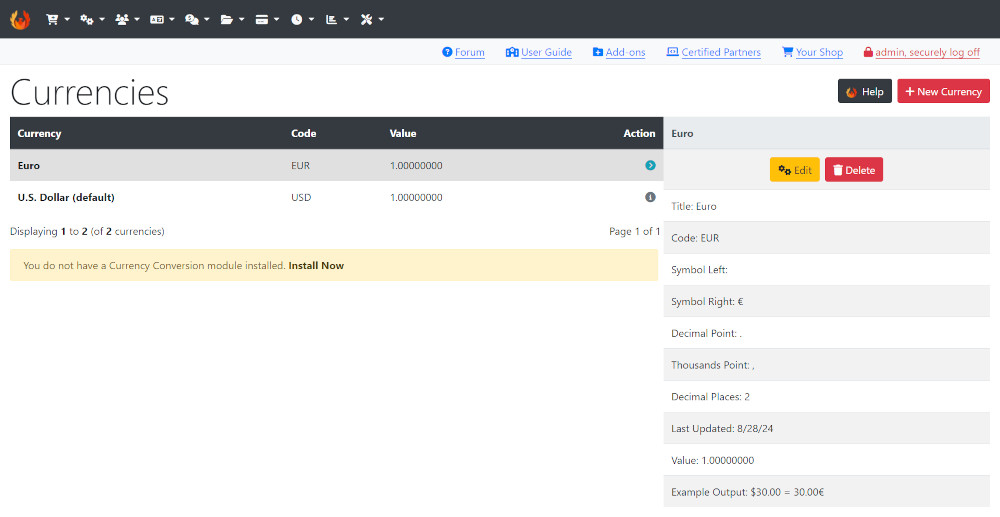
CE Phoenix Cart has Euro and U.S. Dollar currencies installed.
See U.S Dollar (default) indicating that it is set as the default currency to use in the store.
If you wish to use a different currency click New Currency and install from the drop down list that will show in the right panel and set it as default.
If you wish to use only one currency, remove unwanted currencies in the main list on the left by clicking on the currency and click Delete
Optionally, disable or remove the Currencies module in Navbar - Modules → Navbar as it serves little or no purpose if you use only one currency.
If you wish to use more than one currency first install a currency updater module.
- Click the Install Now link which will take you to admin
 Modules → Update Currency
 - Click Install Module shown top right of screen - the number shown next to it indicates the number of modules available.
- Click a module to use from the list.
- Click Install Module
- Click Edit
- Enter a Sort Order value. Do not leave 0 as the Sort Order on modules as it can cause problems. You can give it any number, in this case enter 10 so if you decide to install another module it leaves the option of entering a lesser value for the next if required.
- Click Save
Come back to this page and click Update Exchange Rate
This must be done daily to keep updated.
If you have more than one language installed:
- Go to admin → Configuration → My Store → Switch To Default Language Currency
- Set to true - the currency will change to match the language selected by the customer.
Many Addons and Extensions available in the CE Phoenix Cart Addons Library
If help is needed, support is available in the CE Phoenix Cart Support Forum
Phoenix Cart User Guide, like CE Phoenix Cart, is free to use but is maintained by unpaid volunteers.
All other content is the reserved Intellectual Property and Copyright of phoenixcart.org
