Manufacturers
From Phoenix Cart User Guide
Back
Administration
Go to  Catalog → Manufacturers - you will see this:
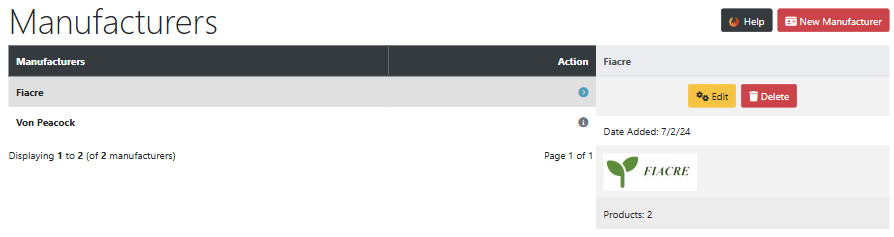
Delete Manufacturers
- Click on a manufacturer to select it in the list.
- Click Delete
New Manufacturers
- Click New Manufacturer - you will see this:
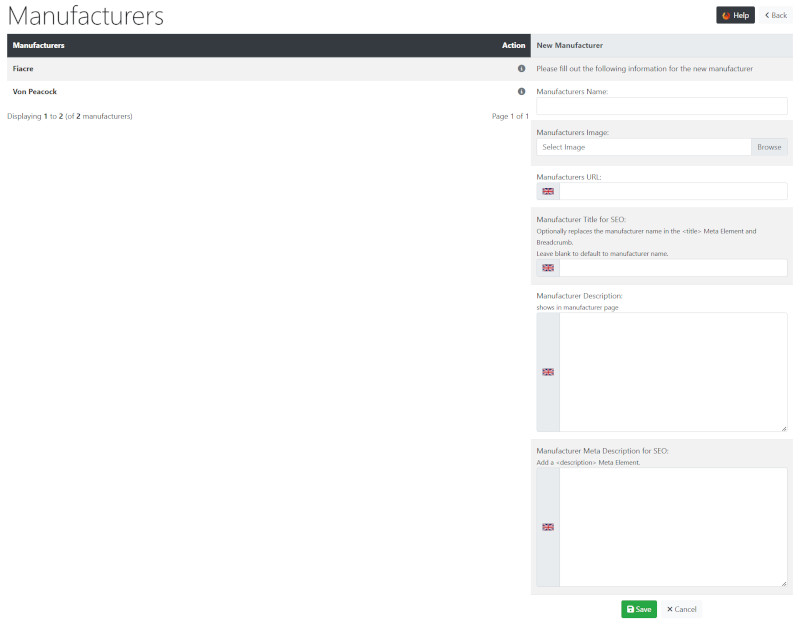
- Manufacturers Name:
- Enter the name.
- Manufacturers Image:
- Click Browse to choose and upload an image from your computer.
- Manufacturers URL:
- Enter the website address if required
- Manufacturers Title for SEO:
- Enter a title for search engines if required.
- Manufacturers Description:
- Enter a full description.
- Manufacturers Meta Description for SEO:
- Enter a short description for search engines.
- Click Save
Tip:
With some sideways thinking, Manufacturers can be alternatively be used as a secondary method of categorising products.
For example, using the sample products, Yellow, Green, Orange, Red could be entered to enable a secondary categorisation by colour.
Note in this case that language defines would need to be changed so Colour showed instead of Manufacturer on the shop.
Many Addons and Extensions available in the CE Phoenix Cart Addons Library
If help is needed, support is available in the CE Phoenix Cart Support Forum
Phoenix Cart User Guide, like CE Phoenix Cart, is free to use but is maintained by unpaid volunteers.
All other content is the reserved Intellectual Property and Copyright of phoenixcart.org
