Difference between revisions of "ADMINISTRATION"
PeterRobert (talk | contribs) |
PeterRobert (talk | contribs) |
||
| (2 intermediate revisions by the same user not shown) | |||
| Line 12: | Line 12: | ||
---- | ---- | ||
| − | |||
| − | |||
==='''Admin Dashboard'''=== | ==='''Admin Dashboard'''=== | ||
After log in you will see the main Admin Dashboard like this: | After log in you will see the main Admin Dashboard like this: | ||
| Line 21: | Line 19: | ||
</div> | </div> | ||
| − | <big>'''[[Lost_Admin_Password|Lost Admin Password? Help here. | + | <big>'''[[Lost_Admin_Password|Lost Admin Password? Read Help here.]]'''</big> |
| + | ---- | ||
==='''Links Bar'''=== | ==='''Links Bar'''=== | ||
| Line 43: | Line 42: | ||
---- | ---- | ||
| − | |||
| − | |||
==='''Navigation Bar'''=== | ==='''Navigation Bar'''=== | ||
The administration navigation bar at the top of the page shows the icon buttons and dropdown menus to access all the administration tools. | The administration navigation bar at the top of the page shows the icon buttons and dropdown menus to access all the administration tools. | ||
| Line 68: | Line 65: | ||
*<big>'''[[Administrators]]'''</big> | *<big>'''[[Administrators]]'''</big> | ||
*<big>'''[[Bootstrap Setup]]'''</big> | *<big>'''[[Bootstrap Setup]]'''</big> | ||
| − | *<big>'''[[Cache]]'''</big> | + | <!--*<big>'''[[Cache]]'''</big>--> |
<!--**<big>'''[[Customer Details]]'''</big>--> | <!--**<big>'''[[Customer Details]]'''</big>--> | ||
*<big>'''[[Download]]'''</big> | *<big>'''[[Download]]'''</big> | ||
Latest revision as of 09:42, 2 November 2024
Login
When you go to yoursite/youradmin/index.php you will see this:

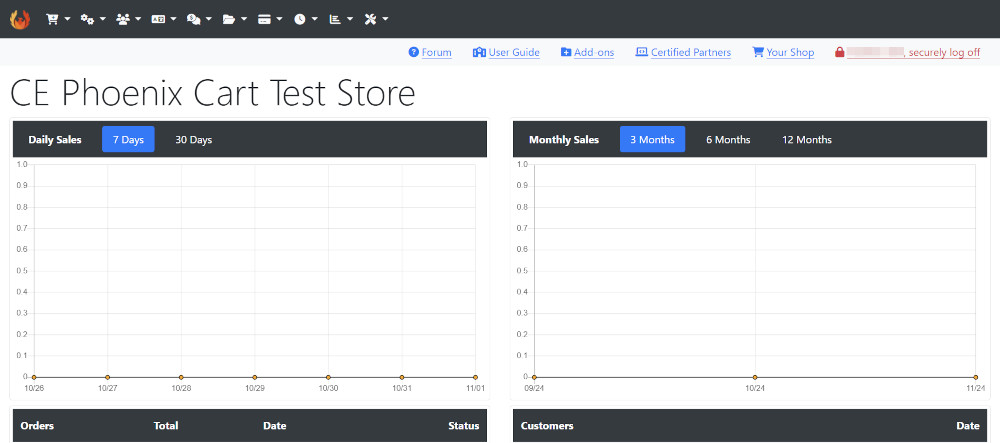
Admin Dashboard
After log in you will see the main Admin Dashboard like this:
Lost Admin Password? Read Help here.
Links Bar
There are links in the header of the Admin Dashboard.
Links are shown like this:

- Help goes to the CE Phoenix Cart Forum - find help from other users.
- User Guide goes to the CE Phoenix Cart User Guide (you are reading it now).
- Add-Ons goes to the CE Phoenix Cart Add-Ons Library - find Addons and Modules to extend your CE Phoenix Cart.
- Certified Developers goes to a list of CE Phoenix Cart Certified Service Providers - engage with them directly for design and development work.
- Your Shop goes to your website as viewed by visitors.
- securely logoff does just that.
The administration navigation bar at the top of the page shows the icon buttons and dropdown menus to access all the administration tools.

The following guides detail all the menu buttons.
 Catalog
- Categories/Products
- Manufacturers
- Products Attributes
- Products Expected
- Reviews
- Specials
- Testimonials
 Configuration
- Administrators
- Bootstrap Setup
- Download
- E-Mail Options
- GZip Compression
- Images
- Logging
- Maximum Values
- My Store
- Product Listing
- Sessions
- Shipping/Packaging
- Stock
- Store Logo
 Customers
 Localization
 Locations & Taxes
 Modules
- Action Recorder (modules)
- Actions
- Boxes
- Content
- Customer Data
- Dashboard
- Header Tags
- Hooks
- Layout
- Navbar
- Notifications
- Order Total
- Payment
- Shipping
- Update Currency
 Orders
 Queued E-mails
 Reports
 Tools
Tools
- Action Recorder
- Advert Manager
- Database Backup
- Database Tables
- Info Pages
- Newsletter Manager
- Security Checks
- Security Directory Permissions
- Send Email
- Server Info
- Version Checker
- Who's Online
Many Addons and Extensions available in the CE Phoenix Cart Addons Library
If help is needed, support is available in the CE Phoenix Cart Support Forum
Phoenix Cart User Guide, like CE Phoenix Cart, is free to use but is maintained by unpaid volunteers.
All other content is the reserved Intellectual Property and Copyright of phoenixcart.org
